Central Processing Unit (CPU)The central processing unit (CPU), is often referred as the "brain" of the computer and it contains a number of multi-processors. There are two purposes of the CPU. The first purpose is to manipulate data, which is where finding, arranging, calculating and decision-making takes place in the computer. The second purpose is to carry out instructions to other devices from programs. For instance, if the user wants to print a file, the CPU would instruct the printer to do so. Furthermore, inside a CPU, it contains a quartz clock and its reason for so is to control the amount of time it has to process each piece of data. A CPU's clock speed is measured in cycles per second which is equal to 1 Hertz (Hz). For instance, if a computer is running at 1 GHz (gigahertz), it can carry out a thousand million instructions per second. But nowadays, desktop computers run extremely rapidly because it runs on 3 GHz which carries out three thousand million instructions per second! All in all, the higher clock speed results in a better and faster performance of a computer. On the contrary, modern computers may contain two or even four CPUs, which some chip-manufacturing companies call "cores". A computer having two CPUs is called, dual-core (32-bit processors) whilst a computer having four CPUs is called, quad-core (64-bit processors). Likewise, for a better and quicker performance, the computer should run on more than one CPU. Additionally, the price range for CPUs is approximately $10 - $4000 (USD); thus, poor-working CPUs are cheaper than fast-working CPUs. Intel and American Micro Devices (AMD) are the two major manufacturers of CPUs. On the other hand, there are other manufacturers such as: IBM, Gateway, Dell and etc. In conclusion, no matter what you do on the computer, the CPU makes these tasks possible by processing data and carrying out instructions from programs. | 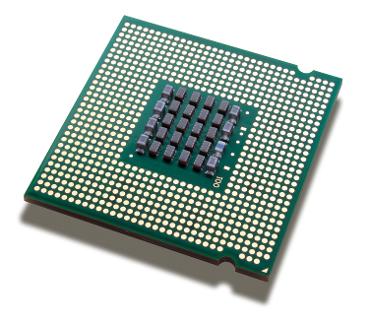 |
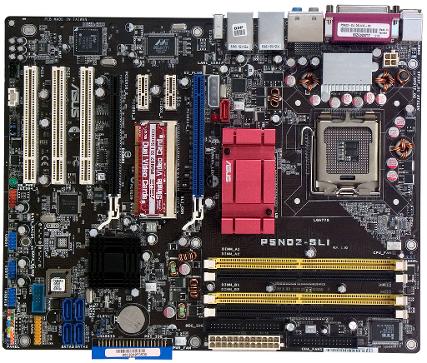 | MotherboardThe most essential part of the computer is the motherboard, (also known as, the main-board). It's job is to connect computer components together, so information and data could travel between components. All motherboards contain: a motherboard chipset; BIOS (basic input/output system); processor socket; CMOS (Complementary Metal Oxide Semi-conductor) clock and battery; system bus; RAM (Random Access Memory) slots; and many other integrated components attached. Asus is known as the world's bestselling and most award winning manufacturer of the finest motherboards. But, there are other manufacturers such as: Intel, GigaByte, Medium Scale Integration (MSI) and etc. The price range for motherboards is nearly $7 - $21,000 (CAN); hence, cheaper motherboards do not function efficiently as expensive motherboards. Moreover, in order for your motherboard to deliver information and data between different components faster, you'll have to consider the bus speed of the motherboard. A bus is expressed by the sum of information that can be sent out at once, which is measured in bits (corresponds to the number of lines which data is sent at the same time). The word "width" refers to the number of bits that a bus can pass on immediately. In addition, the term "frequency" (also defined as the bus speed) is measured in megahertz (MHz), which is the number of data packets sent or received per second. By multiplying its width and its frequency, you could find out the maximum transfer speed of the bus. Furthermore, a CPU's bus speed should match a motherboard's bus speed because a CPU would not work any faster if it has a faster bus than a motherboard. In summary, the motherboard is the key part of the computer since it allows data to be passed through between components and it connects all components. |
Power SupplyThe power supply, is accountable for supplying current to all computer components in order for it to operate. It utilizes electricity from the power outlets and then it converts the electricity into proper voltage, wattage, and amperage to match the computer components amount of electrical energy needed. Most consumers prefer to purchase their power supply from Corsair. However, there are other manufacturers, such as: Nexus, Asus, OCZ and many more! Different power supplies have different prices and it could range from approximately $1 - $198,000 (CAN). For over many years, fans and hard drives are connected to the power supply by the Molex connector. It looks like a flat white plug with four wires and connectors. Providing +12 volts is the red wire, +5 volts is the yellow wire, and the other two wires that are black is for grounding. On the other hand, the most recent manufactured power supply includes a Serial ATA (SATA) power plug for newer hard drives. The modern power supply is called a switching power supply, because it converts the alternating current (AC) from a power outlet into direct current (DC) inside the computer. For it to operate it must have a load, otherwise, a built-in-safety function will turn off. Additionally, a small orange or gray wire usually has to be grounded through the computer's motherboard to keep the power supply on. The power supply provides several voltages to the computer based on the colour of the wire attached. There would be several different colours of wires in the large connector that attaches to the motherboard, which are: red (+5v), blue (-12v), yellow (+12v) and black (ground). All in all, the power supply is the one pumping electricity to all the computer components. | 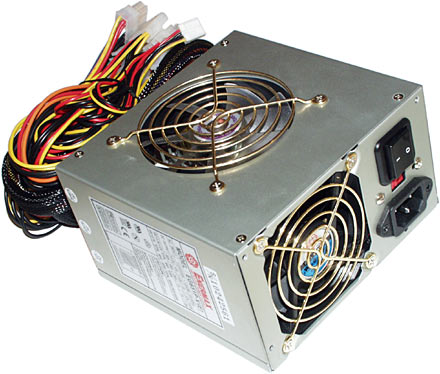 |
References:
· Passmark Software. (2013). High end CPU's - intel vs amd.
Retrieved from http://www.cpubenchmark.net/high_end_cpus.html
· Shukla, I. (2011, September 29). Types of computer processes. Buzzle.
· Daemon, I. (2012, December 1). Cpu - central processing unit. InetDemon.Com.
Retrieved from http://www.inetdaemon.com/tutorials/computers/hardware/cpu/
· Teach-ICT. (n.d). Central processing unit home.
· Signal, M. (n.d). Should motherboard speed match processor speed? eHowtech.
· Exenter2. (2009). From sand to chip [film clip].
· PCWorld. (n.d). Find motherboards.
· Asus. (n.d). Motherboards.
Retrieved from http://ca.asus.com/en/Motherboards/
· Wilson, T., & Johnson, R. (n.d). How motherboards work. howstuffworks.
Retrieved from http://computer.howstuffworks.com/motherboard4.htm
· Kioskea contributors. (n.d). What is a computer bus? Kioskea.
· Khan, S. (n.d). What is system bus speed? eHowtech.
Retrieved from http://www.ehow.com/about_6365026_system-bus-speed_.html
· Dipolito, S. (n.d). Motherboard: the backbone of the computer. Steve Speaks Geek.
Retrieved from http://www.stevespeaksgeek.com/motherboard.html
· OverlookingTV. (2010). How to make a motherboard - a gigabyte factory tour video [film clip].
· PCWorld. (n.d). Find power supplies.
· Dipolito, S. (n.d). Computer glossary p. Steve Speaks Geek.
Retrieved from http://www.stevespeaksgeek.com/computer_glossary_p.html
· RealHardTechX. (n.d). PSU review database.
Retrieved from http://www.realhardtechx.com/index_archivos/Page541.htm
· MMO-Champion. (2012). Thread: what power supply brands do you guys recommend?
· Bartlett, B. (n.d). Computer power supply information. eHowTech.
· Maxxarcade. (2010). A look at computer power supplies, part 1 of 2 [film clip].
