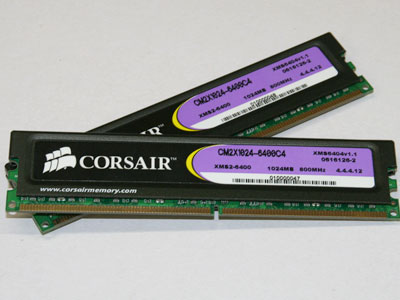
 | Random Access Memory (RAM)The Random Access Memory (RAM), is responsible for storing current data and programs. This type of storage is called volatile memory, which means it loses its current data once power is gone. There are two categories of RAM, which are DRAM (Dynamic Random Access Memory) and SRAM (Static Random Access Memory). Mushkin is the world's independent memory manufacturer. But, there are other brands that are recommended by consumers, such as: Crucial, Kingston, Corsair and etc. The price range for RAMs is $2 - $21,000 (CDN); hence, cheaper RAMs have poor amounts of bytes whilst expensive RAMs have large amounts of bytes. RAM access time is measured in nanoseconds, and hard disk access time is measured in milliseconds. The RAM contains thousands of small capacitors that store loads. The reasonable state of the capacitor is equal to 1 (when it is loaded), if not it is 0, which means that each capacitor represents one memory bit. Since capacitors become discharged, they must recharge at regular intervals, which is called the refresh cycle. Each capacitor is coupled with a transistor which enables its status. These transistors are arranged in the form of a table; thus, it's called a memory box. Each memory point is distinguished by an address that is suppose to match to a row and column number. The access time period is known as latency time. The total amount of time required for access to data in the memory is equal to the cycle time plus latency time. For example, for a DRAM memory, the access time is 60 nanoseconds (35 ns cycle time and 25ns latency time). On a computer, the cycle time corresponds to the opposite of the clock frequency. For instance, a computer with a frequency of 200 megahertz (MHz) has a cycle time of 5 ns (1/200*106). To reduce the amount of time that it takes the CPU to read data from the hard disk, having more RAM in the computer helps to do so. |
Hard-driveThe main purpose of the hard drive, is to permanently store data and programs. The magnetic platters hold data and programs whilst the controller, reader and writer heads, actuator arm plays a role in the storing and retrieval of data. It's connected to the motherboard by using a hard drive controller which acts as a boundary between the CPU and the hard drive. IBM manufactured the world's most expensive and largest hard drive, costing $250,000 but it got taken down. However, there are other manufacturers such as: Fujitsu, Seagate, Western Global and etc. The price range for hard drives is nearly $15 - $12,000 (CDN). The hard drive operates in an orderly manner when you want to have access to data from the hard drive. The computer then sends a note to the controller. Next, the controller searches for its registry to locate the data. Once the data is found, the controller moves the heads to their appropriate designation. After that, the controller uses the actuator arm that is attached to the heads to read data off from the magnetic platters. When the motor spins the magnetic platters to reach their maximum operational speed, the actuator begins to read the data. After reading the data, it is sent to the controller card's buffer. The buffer then sends the data into the motherboard through a cable. Finally, the motherboard processes the data and handles it in the way it shall be done. Furthermore, the speed at which the magnetic platters spins is measured in rotations per minute (rpm). Hard drive speeds from an order of 7200 to 15000 rpm. However, the faster the hard drive rotates, the higher its data transfer rate is. Nowadays, a 2.5 inch hard drive stores up to 320 GB per platter, which is upgrading to 500 GB (most drives have two platters). As technology is moving forward, we are likely to see the hard drive capacity increasing. | 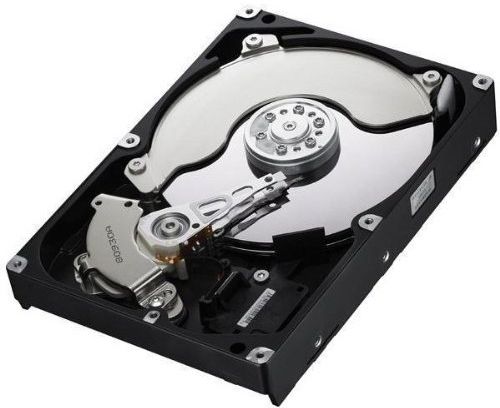 |
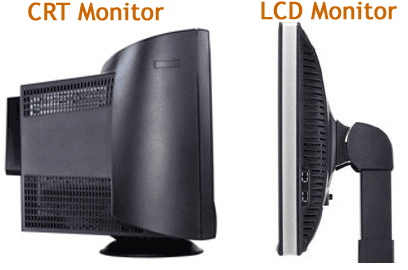 |
MonitorThe monitor is an output device which delivers data. There are two types of monitors that computers use which are: Cathode-ray tube (CRT) and liquid crystal display (LCD) monitors. CRT monitors are very heavy and huge in size whilst LCD monitors are more light and thin. Also, CRT monitors are very electricity consuming, however, LCD monitors are the opposite. Many monitor manufacturers try their best to provide us with the best quality of their products, such as: Samsung, Asus, IBM and etc. The price range for LCD monitors is approximately $67 - $7000 (CDN) whilst the price range for CRT monitors is nearly $29 - $600 (CDN). A CRT monitor operates by moving an electron beam back and forth across a computer screen. Each time it moves across, it illuminates phosphor dots that are present inside the glass tube; thus, it lights the active portions of the screen. The beam then create images by drawing lines from top to the bottom of the screen. On the contrary, LCD monitors operate differently. They utilize two polarized sheets with a liquid crystal solution in between. When an electric current is then passed through the liquid, it causes the crystals to align. This alignment prevents light from passing through. LCD monitors cannot display a wide colour range as a CRT monitor, but it offers sharper, higher-quality graphics and video. Having more lines of dots, results in a higher and clearer the resolution on a CTR monitor. For example, with a setting of 1024 x 768, it would result in a sharper resolution than 800 x 600. Additionally, lower resolutions usually have higher refresh rates (times per second for beams to paint an image on the screen) because it takes less time to paint a lower resolution. For instance, a setting of 800 x 600 may have a refresh rate of 85 Hertz (Hz) whilst, a setting of 1024 x 768 may have 75 Hz. To add on, large screen sizes also require higher refresh rates, and anything less than 75 Hz is normally insufficient. Moving over to a LCD monitor's resolution, a bigger screen may allow a higher native resolution, which results in a very sharp resolution. Also, it'll be able to display more information than a lower resolution can. LCD monitors tend to be bright with standard levels being more than suitable for everyday use. Brightness is measured in nits, they are units of one candela per square meter. In addition, response time is measured in milliseconds (ms), which refers to how long it takes pixels to turn from completely white to black and back again. Smaller values represent a faster response time and a maximum response time should be no more than 25 ms. In short, the monitor is an output device which delivers data. |
References:
V Shopper. (n.d). Shop for ram (random access memory).
Retrieved from http://shopper.cnet.com/buy-computer-memory/?rpp=25&sort=lowPrice9+asc&tag=mncol;page#sort
v ifixit. (2010). What's most often considered the best brand of ram?
Retrieved from http://www.ifixit.com/Answers/View/8065/What's+most+often+considered+the+best+brand+of+Ram
v Rouse, M. (2005). Ram (random access memory). Search Mobile Computing.
Retrieved from http://searchmobilecomputing.techtarget.com/definition/RAM
v WiseGeek contributors. (n.d). What is random access memory? Wise Geek.
Retrieved from http://www.wisegeek.com/what-is-random-access-memory.htm#
v Kioskea contributors. (n.d). Random access memory (ram or pc memory). Kioskea.
Retrieved from http://en.kioskea.net/contents/pc/ram.php3#simili_main
v SuperComputerWiz. (2009). Tutorial: random access memory (ram) [film clip].
Retrieved from http://www.youtube.com/watch?feature=player_embedded&v=GdpF4F9F4XI
v Whatley, T. (n.d). How does a hard drive work? eHowtech.
Retrieved from http://www.ehow.com/how-does_4572119_hard-drive-work.html
v Kioskea contributors. (n.d). Hard drive. Kioskea.
Retrieved from http://en.kioskea.net/contents/pc/disque.php3#32-bit-mode
v Miller, M. (2011, July 12). Hard drive technology: lots of storage in a tiny space. Forward Thinking.
Retrieved from http://forwardthinking.pcmag.com/none/282270-hard-drive-technology-lots-of-storage-in-a-tiny-space
v Shopbot. (n.d). Internal hard drive.
Retrieved from http://www.shopbot.ca/m/?m=Internal%20Hard%20Drive&order=lh&page=2
v Szczys, M. (2012, December 7). $250,000 hard drive teardown. Hack A Day.
Retrieved from http://hackaday.com/2012/12/07/250000-hard-drive-teardown/
v About contributors. (n.d). Hard Drive Manufacturers. About.
Retrieved from http://compreviews.about.com/cs/manhard/
v EEVblog. (2012). EEVblog #395 - world's most expensive hard drive teardown [film clip].
Retrieved from http://www.youtube.com/watch?feature=player_embedded&v=CBjoWMA5d84
v Kioskea contributors. (n.d). Computer screen or monitor. Kioskea.
Retrieved from http://en.kioskea.net/contents/pc/ecran.php3
v eHow contributor. (n.d). What is a monitor? eHowtech.
Retrieved from http://www.ehow.com/about_4697018_what-monitor.html
v Wise Geek contributors. (n.d). What is a crt monitor? Wise Geek.
Retrieved from http://www.wisegeek.org/what-is-a-crt-monitor.htm
v Wise Geek contributors. (n.d). What is an lcd monitor? Wise Geek.
Retrieved from http://www.wisegeek.com/what-is-a-lcd-monitor.html
v Shopper. (n.d). Shop for crt monitors.
Retrieved from http://shopper.cnet.com/4566-3175_9-0.html?tag=mncol;srt&rpp=40&sort=lowPrice9+asc#sort
v Newegg. (n.d). Lcd monitors.
Retrieved from http://www.newegg.ca/LCD-Monitors/SubCategory/ID-20?Order=PRICED
v engineerguyvideo. (2011). Lcd monitor teardown [film clip].
Retrieved from http://www.youtube.com/watch?feature=player_embedded&v=jiejNAUwcQ8
